Product Overview
This product is based on an existing GSM/GPRS network and GPS satellites and can locate and monitor all remote targets via SMS, APP and Internet. It uses the most advanced dual positioning technology of GPS and AGPS
Details
- TK306 GPS Tracker Based on Existing GSM/GPRS Network and GPS Satellites
- 1. SUMMARY
- This product is based on an existing GSM/GPRS network and GPS satellites and can locate and monitor all remote targets via SMS, APP and Internet. It uses the most advanced dual positioning technology of GPS and AGPS
- Features
- 1. Real-time tracking
- 2. Overspeed/Low-power alarm
- 3. Motion alarm
- 4. Entry/exit fence alarm
- 5. Added vibration alarm function
- 6. Added anti-removal alarm function
- 7. Added power saving and GPRS
- 8. Added AGPS function to receive GPS signal faster
- 9. Added built-in memory and upload data in blind area
- 10. Added application set
- Specification
- Network: GSM/GPRS
- Network band: 850/900/1800/1900 MHz
- GPS Sensitivity: -159dBm
- GPS Accuracy: 10m
- Operating Voltage: 12V-36V
- Storage temperature: -40°C to +85°C
- Operating temperature: -20°C to +55°C
- Size: 50*45*20mm/1.96*1.77*0.78''
- Note
- Please allow 1-3mm difference due to manual measurement
- Due to different display and different light, the picture may not show the actual color of the item. Thank you for your understanding.
- 2. Operational
- Notes
- 1). GPS tracking can be operated outdoors. Must have a mobile GSM signal and a GPS signal,
- It can block the GPS satellite signal if metals or buildings are above the GPS tracker.
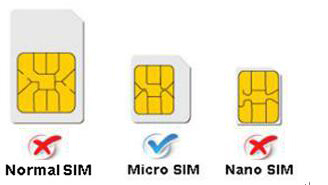
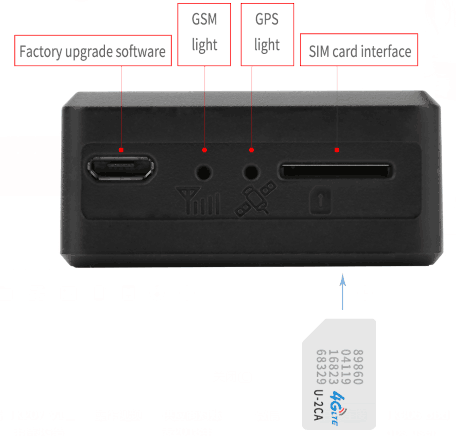
- 2). Please make sure that GSM 2G SIM card or compatible 2G GSM network SIM card, make calls,
- Send messages, GPRS network. Have money, cancel PIN code.
- 2.1 Quick Use
- 1) Insert the SIM card into the GPS tracker
- 2) Insert the tracker into the car OBD interface, drive the car outdoors.
- 3) Send "smslink123456" to the SIM card in the tracker, position information for tracker response.
- EXPLANATION OF PARAMETERS/CODES IN THE SMS MESSAGE
- Image 1: Real-time tracking information answered under GPS satellite signal
- Lat:22.67533 lon:114.03913 Positioning of latitude and longitude
- Spd:000.3 This refers to the moving speed of the device. The unit is km/h.
- T:06/14/17 09:14 Real tracking time, the default is London time. You can set a time zone via SMS command.
- Google Link: This is the link to the Google map showing the device location.
- Image 2: LBS information answered without GPS satellite signal
- smcc:27a4 1223: Real-time LBS data
- Time: 08/00/00 LBS positioning time
- If you receive positioning information like Image 2, please take the GPS tracker outdoors and walk,
- then you can receive the satellite signal.
- 2.2 Insert into the car OBD interface
- Connect the device to the car OBD interface as shown below.
- STATUS OF INDICATOR LIGHT
- MEANING
- Green light - Solid
- GSM signal connection
- Green light - Flashing
- NO GSM or searching GSM signal
- Blue light - Solid
- GPS signal connection
- Blue light - Fast flashing
- Searching for GPS signal
- Note: All LEDs turn off after 10 minutes for best concealment.
- when you call the device mobile number, the LED lights up again to work.
- Connect 12V-36V power supply voltage.
- 3. Support website tracking and APP tracking.
- 3.1 Scan APP and download APP
- 1) Scan QR code --- Open with browser --- Select Android or iPhone --- Download --- Install app
- 2) Download iOS APP: Log in to App Store --- dagps --- Install the dagps APP
- 3.2: Login platform positioning
- 1) Open www.gps110.org
- Use the tracker IMEI to log in, default password 123456.
- You can track the device, it's fine.
- NOTE: If you insert the correct SIM card and open GPRS, the device is still not online outdoors
- Please set the APN commands. We have two methods,
- to find out the APN content: Ask the SIM card or insert the SIM card into the mobile phone to find the APN
- find out SMS1: APN123456+space+APN name (for example, say that
- the APN name is ABC, so send APN123456 ABC) If you have the APN username and password,
- you need to enter the APN username and password after the APN name
- enter) e.g.:APN123456+space+APN name+space+APN username+space+APN password
- If you want to use another platform, please set a new IP and port.
- SMS1: admin123456+space+IP+space+Port
- Example: Admin123456 103.110.152.62 7018
- 4. SMS Command Instruction
- NOTE
- 1) Default password of device: 123456
- 2) Use mobile phone APP or send a message to the tracker for all set commands, note the space in the command.
- 3) The default mode is "GPRS". Send sms123456 to the tracker to close GPRS and switch to SMS mode. Send smsgprs123456 to open GPRS mode.
- 4) The default alarm way is SMS + platform, send the command "way123456 2" alarm to SMS + platform + call.
- INSTRUCTION
- Example
- ANSWER
- Set the admin number,
- supports 5 admin numbers.
- admin123456 mobile number
- Admin number alarm message received
- admin ok
- Cancel admin number
- noadmin123456 mobile number
- noadmin ok
- Set timezone
- Timezone123456 1
- (1 is East 1, -1 is West 1)
- Timezone ok
- Set timezone (half timezone)
- Timezone123456 8 30
- (8 30 is timezone East 8.5)
- Vibration alarm
- Shock123456
- Shock ok
- Cancel vibration alarm
- Noshock123456
- Noshock ok
- Intelligent mode
- saves power and GPRS
- Sleepin123456
- Upload position data when the vehicle is moving and do not upload position data when the vehicle stops
- Sleep good
- Cancel intelligent mode
- Sleep123456
- Wake up ok
- Parameter
- Check123456
- Device status
- Real-time tracking (default 10s)
- fix030s***n123456
- every 30 seconds/1 time positioning, can change time interval
- T n ok
- 5. FAQ and processing methods
- FAQ
- Instructions/Solutions
- Error when switching on
- Insert card, switch on and connect 12-36V power supply from the OBD interface
- No GSM signal
- Please check if the SIM card is correctly installed and if you have credit,
- if there is a GSM signal from the mobile phone, please check,
- whether the SIM card is a 2G or compatible 2G GSM network. And have mobile phone signal.
- Do not enable PIN code
- No calls can be forwarded
- Please check if the power supply voltage is normal
- No GPS
- A more open view of the sky is recommended to ensure the device can receive GPS signal normally
- Outdoors and take the device to walk around